Thursday, 31 August 2017

UP Box+... Any Better or still Biggest waste of money (and Time) ever spent

So following on from my first UP Box post, I had left a review on the Tiertime forums, roll on a couple of weeks, Tiertime emailed me after I had posted my annoyance on their forums, to offer me the latest version of the Up Box, the UP Box+ which they promised has fixed all the issues I had seen. 

So after much thinking I gladly accepted this. This was back in March time and so this is an update for the UP Box+

So eventually I received the new printer, unboxed it, and started it printing. Two prints in, the printer stops working, little did I know that the printer now needs to be registered with UPBOX via the internet and the upbox software, meaning you need to sign into the software in order to register the UP Box.

Once we were back up and running, I decided to run an auto level, which ran ok after the third attempt (the biggest issue was the Height detect, which sometime didn't detect correctly - it requires a really clean nozzle and also appears to be the newest updated feature, before there was a small lever that the nozzle pushed down to detect the height I am guessing that this was removed as a weakness - although never had an issue with that one).. Anyway This now has failed completely after a few months use (this then means that you have to manually perform bed levelling).

Also now with the UPBox+ you receive the flex build platform which doesn't work all that great..

On the plus side, the issues that plagued the first UP Box appear to have been fixed, the cable to the print head is now secured with an injection moulded clamp as opposed to a 3D printed part, and the print head is now secured by a screw to the drive mount.

Finally it appears that the new UPBox+ is finicky with what manufacturer of filament it will print with, currently I can only use RigidInk to reliably print anything.

To summarise:-
Would I now recommend the UP Box to anyone else? NO... It still not a great printer.
Whilst the weak parts of the previous UP Box appear to have been fixed, that is the print head cable strain relief - which was the biggest problem for print failures.

New problems that are now seen:-

  1. Doesn't correctly level all the time (Takes a few attempts to level correctly) - Even the technical support guy who delivered the printer said it takes a couple of attempts, and that he normally ends up manually levelling. After a month or two, the auto height detect no longer works (the operation of this has changed), therefore you can no longer level the print bed automatically, and are left to manually level.
  2. Occasionally you get a motion error control notification on the software at the end of a print. This means you have to switch the printer off and on again to clear the error.
  3. Now appears to be very fickle with filaments, really doesn't like using many different filaments and the only one that is 100% reliable is Rigid.Ink (But then this is really good stuff), but I would have expected formfurtura to work fine, but end up finding that the printer will start air printing part way through!


Friday, 25 August 2017

Exciting news - 3D printing business now fully underway!

Hi All,

Having spent the last year building up a 3D printing business (This being the reason for the long time since the last post), I am pleased to announce that Regulus 3D is officially operating from September for 3D printing your models, being run and operated by my Wife, However I am still the technical authority, and will be technical support for the printers.

We are starting out with the CEL Robox, but will be adding to this in October, so get sending us your print requests, we are also on 3DHubs

https://www.3dhubs.com/manage/Regulus3D#/hub/home

We have already been developing a standard product range that we will be printing, including Raspberry pi Cases, and Radio controlled 1/10th scale car parts - Watch this space for pictures of some of our recent prints

Tuesday, 20 December 2016

UP Box... Biggest waste of money (and Time) ever spent

Can I say that the original UP box has been the biggest waste of money ever - We have been using this for just under a year (purchased from CPC in Feb 16, even though we find out from the UK distributor that the printer (from the serial number) is now out of warranty from the manufacturer! - 1st bad point).

So in this time we have had several failures,

1) It has had a replacement CPU board,
2) 6 x print head FPC cables (In fact this is a serious design flaw of the UP Box, and requires regular maintenance),
3) The brackets that hold the print head board on need regular replacement...

4) We are on our second print head (£250 for a new print head and extruder), when all that was needed was a new extruder wheel on the stepper motor

5) Where we used to be able to print a whole platform, now restricted to just the middle area of the platform, otherwise the printer stops printing mid way through - from not extruding, to prints lifting.

6) Latest error after replacing the FPC boards (as we suspected the connector on the board had now worn out), the up box levelling system has broke (this happened, as the levelling system came switched on on its own at the start of the print and them proceeded to crash into the print bed, destroying the microswitch in the process) - Levelling system seems to stay off until the print head is about to start printing, and then randomly starts to move down and up!!!

7) Front door doesn't close properly (appears to be warped, and the hinges need to be twisted inorder to close correctly)

So conveniently now we have a printer that appears to be out of warranty from the manufacturer - and they don't recognize that it was brought new a few months after it was manufactured! and is now developing major issues just outside the warranty!

Would I buy an Up again? - given the issues here, No... And actually I have recently purchased for myself a Cel-Robox, plus a Raise3d printer for the office as a second machine. Note the Raise3D N1 has the same build area as the Up Box, is dual extruder, build quality is twice (if not three times as good) as the UP box, and is only £500 more that the UP..What this says to me is that the Up Box is overpriced for what it is.

Oh did I say I now need to get the thing working again!! = more money

Saturday, 1 October 2016

Issues with Filament suppliers

This post talks about the issue with buying poor quality filament!

So with the UP box I have been buying Filament from CPC that is supposed to be approved for the UP printer (has UP on the box). Now this is not to be confused with the filament labelled from Tiertime.


Now I think that if you are supplying plastic filament for 3D printers, you really need to know and understand the issues of supplying quality filament, and also supplying filament that has been stored correctly! I have had maybe 6x reels of yellow filament from CPC, then I went to order some more filament and could only get green - no probs I can handle using Green.

However upon receipt of 6 reels, I had to return two as they had been pierced (letting in oxygen). Now who know how long those reels had been pierced, but it was obvious when opening the box that this had happened as the vacuum seal on the reels had been compromised.

This is what was presented to me when I first opened up two of the reels.


I returned them, and then asked for replacements. 5 days later I had my replacements turn up - only to find that in fact CPC had put the reels I had returned back into stock and then picked that stock back out in order to send back to me. So I received the same reels of filament that I had sent back.

This is what un-opened reels of filament should look like:-


A good vacuum seal - See CPC when it comes to goods return inspection - look this is sealed filament not a loose bag!.

I have been using the replacement filament, and have to say that the quality isn't as good as the filament I have personally used, which is from Rigid Ink. The filament supposedly designed for the UP is not as accurate, and has issues in the UP printer, in as much doesn't sometimes extrude and clogs the extruder up. However the Rigid Ink lives up to its promise to which praises itself on the quality, prints all the time without problems.

The moral of this is that if you want to buy filament for your printer but from a descent supplier that knows what they are doing with filament and knows how it should be treated - CPC is NOT one of them!


Friday, 16 September 2016

Up! Box Printer Issues!

Hello. Sorry its being a few long months since the last post, mainly a mix of working away from home, then Holiday, then more work (Trying to get the printer to work at the same time).

And so to the issues with the printer not work - It has now being back for repair 2 x times, firstly there was a replacement hot end board, then next a replacement CPU! (On the plus side, that means new firmware that is capable of handling the new version of PC software for the UP products)

Now following up with my review of the UP box, I would like to say it is not designed for someone that isnt technical. You will need to replace the 3D printed parts that are in the unit. I have found so far that I have had to replace the mount for the hot end board, and then at the same time replace the cable restraint for the hot end - luckily these are 3D printed files supplied with the software installation.

So the first photos below show the cable in the FPC connector on the hot end board, and the 3D printed mount


The next photos show the cover that provides the strain relief for the FPC cable


Unfortunately if you don't have these already printed out and they wear out, you have to glue the screws back in to give you a chance of printing out the spare part.

Finally the other issue that I have found is the cable that connects the main board to the hotend, this cable is a flat ribbon cable that connects to an FPC connector (Not the best connector for something that has constant movement)
Image result for fpc connector
 - I believe that this is the biggest design flaw. Luckily being technically minded I was able to spot that the issue I was seeing where the print was stopping a while through, due to the head being too cool, was actually due to the cable not making a good connection in the connector.

Luckily the Guys at Denford - who are the UK distributor for Tiertime UP, realized I was technically minded and therefore When I asked them to send me a spare cable, they did...Otherwise a 2 days fix could've turned into a two week fix! 

So now I am back up and printing, with a new cable and newly printed out parts.

Saturday, 30 July 2016

Rigid Ink Nylon 12 with the UP! Box Printer Review

It has been a while now since my last post, I have been meaning to get a write up done on the RigidInk Nylon filament done for some time.

Following on from My PMMA filament review med UP! Box Printer, I was interested at se how the printer handled Nylon filament. Rigid Ink do a nylon 12 filament som enligt specification prints in the same region as ABS (260) nemlig setup on the UP! Box.

Now I have ulterior motives for trying out Nylon, in as much as I would like to print out some parts to make a Drone, and I have been reading up that Nylon might just be the material-to-use.


As you can see even on the basic abs settings of the UP Box printer, the Nylon filament prints really well. In fact yet again the Filament from Rigid Ink works really well, with consistent results.

Only issue I have seen with some other prints is that because the filament is being extruded at a higher temperature than recommended, there is quite a bit of oozing afterwards, which has been a problem with intricate parts. I am sure that if the UP software allowed for adjusting of temperature then this would be no problem.

Thursday, 12 May 2016

Rigid Ink PMMA and the UP! Box Printer

Well after trying the Rigid Ink ABS, I figured I would give their PMMA filament a try as it extrudes at around the same temperature as ABS specified for the UP! Box Printer (Note that the UP! Box has a fixed pre-programmed setting for ABS, Therefore you have to get the right spec material to match with the fixed temperature setting), Therefore suitable for use with the UP! Box printer.

PMMA is a Plexi Glass (Acrylic)  filament.

So printing out the Marvin robot gives me the following results based on 100 micon layer resolution


Looking at the printout, this is much more clearly defined than the ABS Printout, the Keyring loop comes out nice and clean

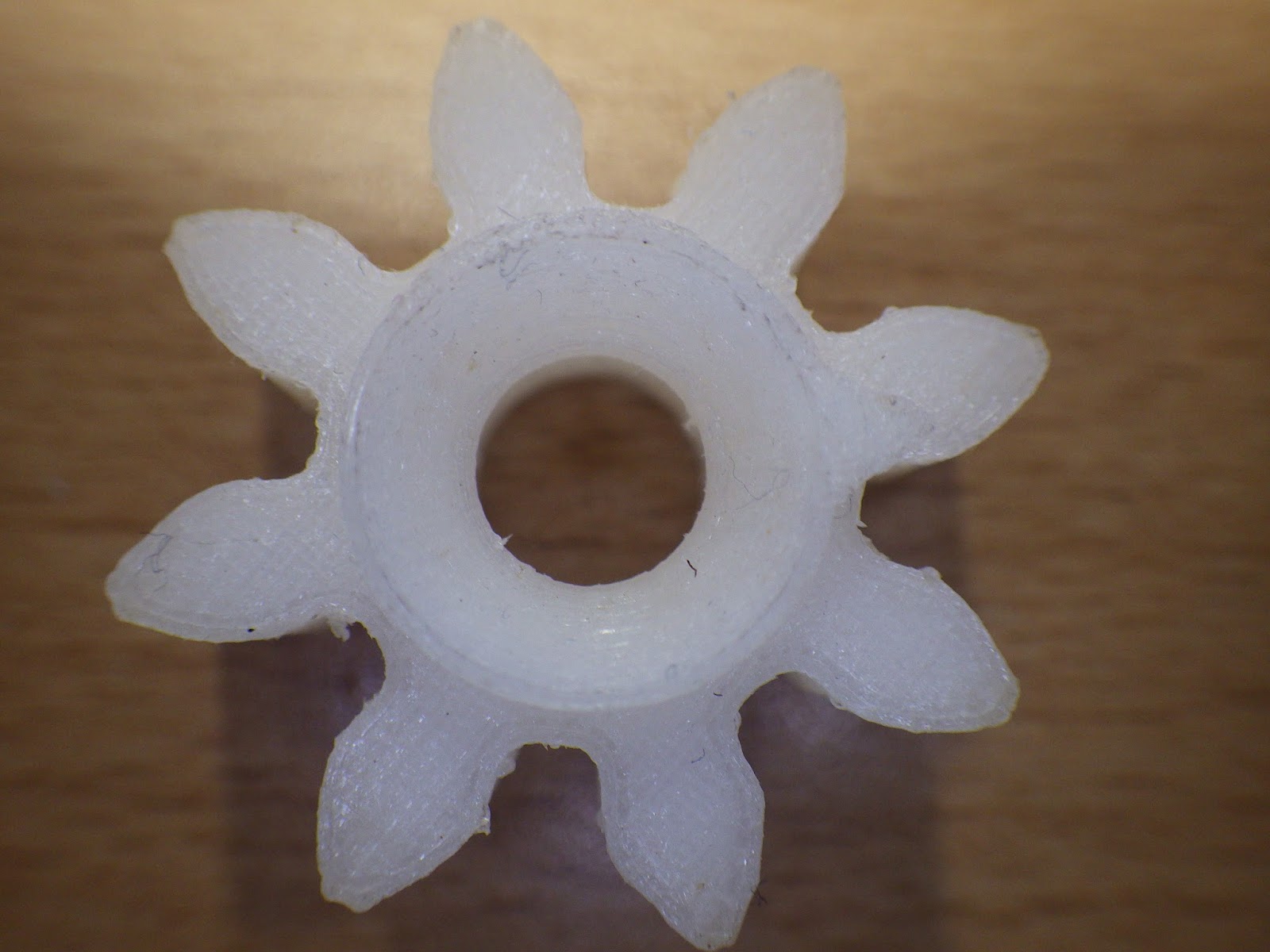
With the next print, a cog, just to see how accurate we can go.


Finally a nut and bolt, the thread here is almost perfect, this is exactly how it came off the printer.


All Prints come out really clean and defined, I think the natural translucent material would make a good filament for printing out some designs I have for Orchid pots, as this will allow light to the roots, as well as providing a decorative pot.

Yet again I am amazed at the quality of the filament from Rigid Ink, Absolutely top quality, You can find their filament either directly from Rigid Ink

https://rigid.ink/products/pmma-1-75-mm-0-03-mm-tolerance

or you can even buy from Amazon

https://www.amazon.co.uk/rigid-ink-Filament-Printers-Tolerance-Translucent/dp/B01C8P46FY/ref=sr_1_1_det?ie=UTF8&qid=1462576152&sr=8-1#productPromotions